
How do I save and reuse message templates?
In CareFunnels, saved message templates are called Snippets. They let you write a message once and reuse it anytime — so your team isn't typing the same follow-up texts and emails from scratch every time. CareFunnels comes with snippets already built for client and caregiver follow-ups, and you can create your own too.
Note: Snippets are available on the CareFunnels CRM plan and all Marketing In A Box plans. If you don't see the Marketing option in your menu, reach out to your CareFunnels account manager to learn more about upgrading.
Where to find this
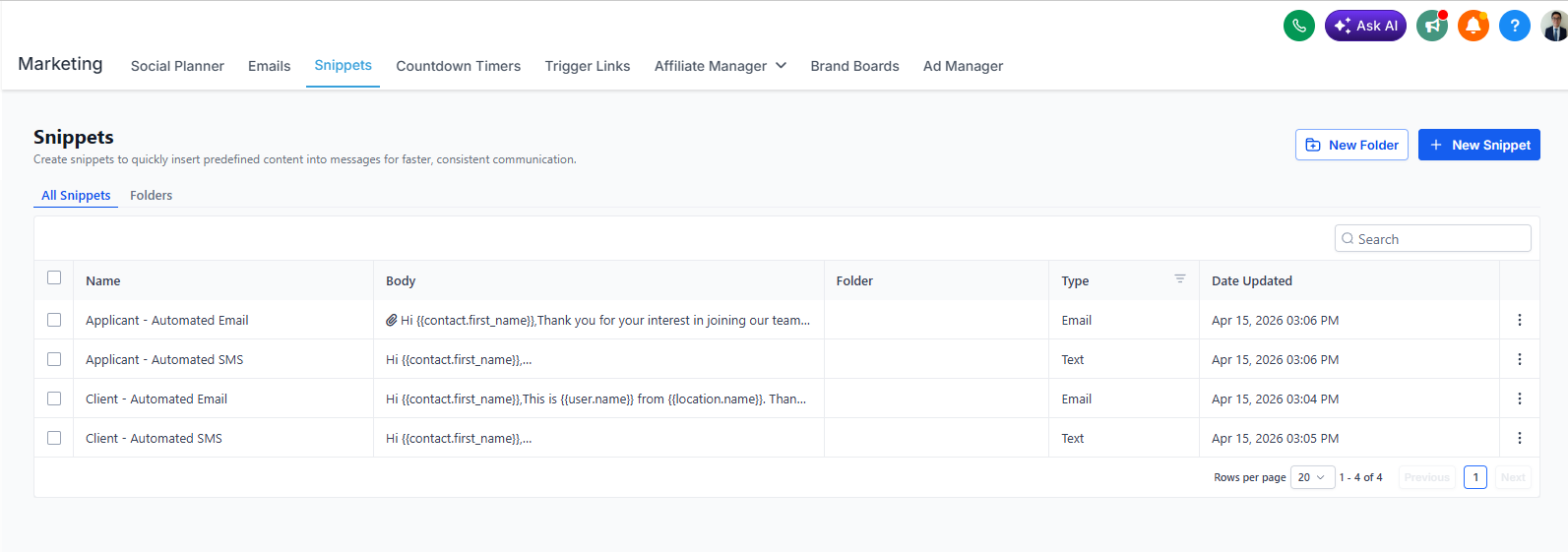
Marketing → Snippets
What snippets come ready to use?
CareFunnels includes four snippets out of the box:
Applicant - Automated Email — a follow-up email for new caregiver applicants
Applicant - Automated SMS — a follow-up text for new caregiver applicants
Client - Automated Email — a follow-up email for new client inquiries
Client - Automated SMS — a follow-up text for new client inquiries
These are already personalized with the contact's first name and your agency's details, so they're ready to use right away.
How to create a new snippet
From the left-hand menu, click Marketing.
Along the top navigation bar, click Snippets.
Click the + New Snippet button in the top right corner.
Give your snippet a name so it's easy to find later (for example, "Assessment Reminder - SMS").
Choose the type — Email or Text.
Write your message in the body field. You can personalize it automatically by using tags like {{contact.first_name}} to insert the contact's name.
Click Save when you're done.
How to use a snippet when sending a message
When you're composing a message to a contact, look for the Snippets option in the message toolbar. Click it, find the snippet you want, and it will paste the message in automatically. Edit as needed before sending.
Pro tip
Create snippets for your most common situations — like confirming a care assessment, following up after no response, or welcoming a new caregiver to the team. The more snippets you have ready, the faster and more consistent your team's communication will be.
Common questions
Can I edit the snippets that come with CareFunnels? Yes. Click on any existing snippet to open and edit it. Update the wording to match your agency's tone and voice.
Can I organize snippets into folders? Yes! Use the New Folder button to create folders and keep your snippets organized — for example, separate folders for Client messages and Caregiver messages.
What does {{contact.first_name}} mean? That's a personalization tag. When the snippet is used, CareFunnels automatically replaces it with the contact's actual first name. So if you're messaging Maria, it will say "Hi Maria" instead of "Hi {{contact.first_name}}."
Can my whole team use the same snippets? Yes. Snippets are shared across your account, so everyone on your team has access to the same library of templates.