
How do I update who is assigned to a booking calendar?
How do I update who is assigned to a booking calendar?
Your CareFunnels calendars are already set up and ready to use. But if someone on your team changes roles, leaves the agency, or you want to add a new team member to handle bookings, you can easily update who is assigned to each calendar.
Where to find this
Settings → Calendars → Find the calendar → Click Edit → Staff & Location → Select Staff
Your CareFunnels calendars
CareFunnels comes with five calendars built specifically for home care agencies:
Client Acquisition
Care Consultation (30 mins) — for initial conversations with potential clients or their families
Care Assessment (1 hr) — for in-home assessments with prospective clients
Recruiting
In-Person Interview (30 mins) — for caregiver candidates coming in to meet your team
Pre-Screen Interview (15 mins) — for quick phone screens with caregiver applicants
Referral Partners
Referral Partner Meeting (45 mins) — for meetings with referral sources like social workers or discharge planners
Steps
From the left-hand menu, click Settings.
In the left sidebar, click Calendars.
Find the calendar you want to update from the list.
Click the pencil (edit) icon on the right side of that calendar row.
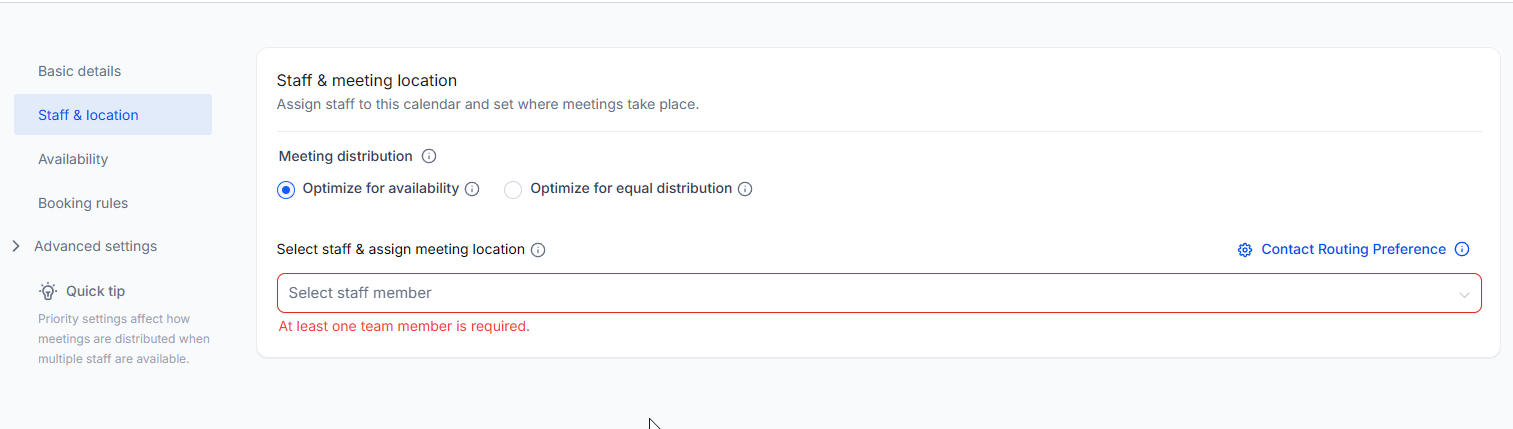
In the left sidebar of the calendar editor, click Staff & Location.
Under Select staff & assign meeting location, click into the staff field and select the team member(s) you want to assign to this calendar.
If you have multiple staff members assigned, choose how bookings are distributed:
Optimize for availability — appointments go to whoever is available first
Optimize for equal distribution — appointments are spread evenly across all assigned staff
Click Save to apply your changes.
Pro tip
Make sure every calendar has at least one active team member assigned — CareFunnels will warn you if a calendar has no staff selected, and bookings won't work until someone is assigned.
Common questions
Can I assign more than one person to the same calendar? Yes. You can assign multiple team members to a single calendar. Use the meeting distribution setting to decide whether bookings go to whoever is available first or are spread equally among the team.
What happens to existing appointments if I remove someone from a calendar? Existing appointments they're already booked for won't be affected. Going forward, new bookings will only go to the staff members currently assigned.
I don't see a team member in the staff dropdown. Why? They may not have been added to your CareFunnels account yet. See the article "How do I add a team member to my CareFunnels account?" to add them first.
Can I temporarily deactivate a calendar without deleting it? Yes. From the Calendars list, you can change a calendar's status. Reach out to your CareFunnels account manager if you need help with this.